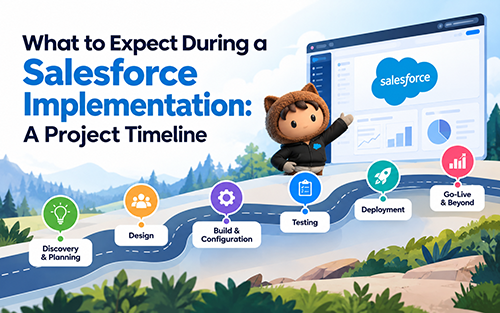
A typical Salesforce implementation takes 3 to 6 months for a mid-market company and 6 to 12+ months for an enterprise, moving through six phases: discovery, design, build, data migration, testing, and go-live. While the phases are predictable, the outcome isn’t. Based on delivery patterns across 300+ Salesforce implementations, this guide explains what happens at each stage, where projects typically lose time, and how experienced implementation teams keep them on track.
Most implementation delays can be traced back to decisions made in the first few weeks, long before anyone notices the schedule slipping. A scope that wasn’t fully defined. A data set that looked clean in a demo but wasn’t. A go-live date committed before the migration effort was validated. None of those issues appear in the kickoff presentation. They usually surface months later, when fixing them is far more expensive.
If you’re evaluating Salesforce implementation partners or planning a rollout, you already know the technology isn’t the biggest challenge. The real complexity lies in migrating data, redesigning business processes, integrating systems, and driving user adoption.
This guide walks through exactly what happens at each phase, how long it takes, where projects stall, who needs to be involved, and what a disciplined go-live actually looks like.
How Long Does a Salesforce Implementation Take?
The honest answer depends on three things: how many clouds you’re implementing, how much you’re customizing, and how messy your data is. Here’s the range by project size.
| Project Size | Scope | Typical Timeline |
|---|---|---|
| Small/SMB | Single cloud, under 50 users, light customization | 4 to 8 weeks |
| Mid-Market | 1 to 2 clouds, some integration and customization | 3 to 6 months |
| Enterprise | Multi-cloud, heavy integration, data migration | 6 to 12+ months |
Four factors move the needle on any timeline:
- The number of clouds in scope
- How much configuration versus custom code the build needs
- How complex the data migration is
- How many systems have to be integrated
Of the four, data migration is the one teams underestimate most consistently. A CPQ migration carrying years of quote history, custom pricing logic, and multi-tier approval chains behaves nothing like a clean greenfield build. Teams that scope it like a greenfield build are the ones who watch a 4-month project become an 8-month project somewhere around week ten.
Running data migration in parallel with build, rather than sequencing it after, is one of the more reliable ways to compress an enterprise timeline. It requires a validation framework mature enough to catch bad records early, which is why partners with migration accelerators (Forsys uses RevRamp for CPQ migrations, for example) tend to hold timelines that generic sequencing doesn’t.
Takeaway:
Scope and data set the timeline. An experienced partner is what keeps that timeline realistic instead of optimistic.Knowing how long the project takes is only half the picture. What actually happens inside each of those weeks matters more, because that’s where projects either stay on track or quietly slip.
The 6 Phases of a Salesforce Implementation
Every implementation, regardless of size, moves through the same six phases. What changes is how much rigor gets applied at each one, and that rigor is usually the difference between a project that ships on time and one that doesn’t.
Phase 1: Discovery and Requirements (2 to 3 weeks)
This phase maps current-state processes, documents requirements, and defines success metrics. The output is a requirements document and a locked scope.
Discovery is also where most eventual scope creep is quietly born. A sales-ops leader mentions a manual approval workaround almost in passing, nobody writes it down, and it resurfaces in month three as an unplanned build item.
Hidden requirements are one of the most common sources of scope creep, and they’re far cheaper to catch in week one than in week ten. Structured discovery workshops, run with the right stakeholders in the room, are what surface them early.
Phase 2: Design and Architecture (2 to 3 weeks)
This is where the data model, security model, and integration architecture get designed. The deliverable is a solution design document that the build phase works from.
The easiest mistake at this stage is designing for what the process looks like today rather than where it needs to go. A design built around today’s workaround-heavy process, only rebuilt faster in a new system, solves nothing that matters to the business. Good design work starts from the target-state process and the outcome it’s meant to produce, not the current org chart.
Phase 3: Build and Configuration (4 to 8 Weeks)
Configuration, automation, and any custom development happen here. The deliverable is a working sandbox that reflects the design.
This is also the phase where technical debt gets built in, quietly, one custom field and one workaround at a time. A configuration-first approach avoids over-customization and the long-term maintenance burden it creates. Every line of custom code is a line someone has to support, patch, and re-test with every future release. Configuration doesn’t carry that cost.
Phase 4: Data Migration and Integration (3 to 5 Weeks)
Cleansing, mapping, migration, and integration work happen in this phase. The deliverable is validated data sitting inside live integrations.
Dirty data doesn’t announce itself during migration. Records look fine in a sample export. It shows up during testing instead, buried in an edge case nobody thought to check, and by then it costs roughly three times as much to fix.
This is the phase where a validation framework matters most: something closer to a couple hundred automated rules catching mismatched record counts, orphaned records, and broken pricing logic before they ever reach UAT. It’s also where accelerators built for a specific migration type, like RevRamp for CPQ data, save real weeks over a generic mapping exercise.
Phase 5: Testing and UAT (2 to 4 weeks)
Functional testing, integration testing, and user acceptance testing all happen here, ending in signed-off UAT.
A system can pass every technical test and still fail on day one if the people who have to use it weren’t part of testing it. A system that works and a system people will actually use are two different bars, and only one of them shows up on a QA checklist. Real end-user involvement in UAT, not just a technical pass, is what closes that gap.
Phase 6: Deployment and Hypercare (1 to 2 Weeks)
Cutover, go-live, training, and support round out the final phase. The deliverable is a live system backed by adoption support.
Support that quietly winds down the week after launch is one of the more common reasons adoption stalls. Go-live is where value starts, not where the project ends, which is why structured hypercare and adoption enablement need to be planned as part of the project, not treated as an afterthought once the system is live. A system that launches on schedule and gets ignored by week three hasn’t actually gone live. It’s just been installed.
Takeaway:
The phases teams underestimate, discovery and data migration, are exactly where an experienced partner earns its keep.A clean six-phase plan is one thing. Knowing you’re actually ready to flip the switch is another, and that’s where a go-live checklist earns its place.
Who Should Be Involved: Governance and Stakeholders
Enterprise buyers ask this early, and for good reason. A project without clear ownership drifts, regardless of how good the plan looks on paper.
- Executive sponsor: Owns the business case, removes roadblocks, and keeps the project connected to a revenue or efficiency outcome, not just a system launch.
- Steering committee: Meets on a set cadence to review scope, risk, and timeline. This is where go/no-go decisions at each phase get made, not left to the delivery team alone.
- Project manager or PMO: Owns the day-to-day plan, tracks scope against the locked requirements from discovery, and flags creep before it becomes a rebuild.
- Business SMEs: The people who actually run the process today. Their involvement in discovery and UAT is what catches the requirements a solution architect would never think to ask about.
- Change champions: One or two respected users per team who pilot the new process early and help the rest of the team trust it. Adoption research consistently shows peer influence outperforms a training deck.
How much internal effort this actually requires depends on project size, but even a mid-market implementation typically needs a part-time project owner, a handful of SME hours per week during discovery and UAT, and executive availability for milestone reviews.
Underestimating this internal time commitment is a common reason timelines slip on the customer side, not the partner side.
Common Salesforce Implementation Risks
Most of what a derails a Salesforce project falls into a short list of recurring patterns:
- Scope creep from undocumented requirements: Requirements mentioned in passing during discovery, never written down, that resurface mid-build.
- Dirty legacy data: Years of quote history, duplicate records, or inconsistent pricing logic that looks fine in a sample but breaks migration validation.
- Over-customization: Custom code built to avoid a process change, which becomes a maintenance burden with every future release.
- Weak executive sponsorship: A steering committee that exists on paper but doesn’t actually make go/no-go calls when the project needs one.
- Testing without end-users: UAT signed off by IT or the implementation team, without the people who’ll use the system daily ever touching it.
- No adoption plan: Training delivered once, at go-live, with no plan for reinforcement in the weeks after.
One recurring example: a CPQ migration for a manufacturing company stalled for nearly six weeks when legacy quote data with inconsistent product codes failed validation late in testing rather than early in migration. The fix wasn’t more testing. It was moving data validation earlier, into the migration phase itself, so issues surface while there’s still time to correct them without pushing the go-live date.
Takeaway:
Most implementation risk is knowable in advance. The projects that avoid it plan for these patterns rather than discovering them mid-project.Knowing what typically breaks a project is only useful if you also know how to check readiness before flipping the switch.
Salesforce Go-Live Checklist
Before the cutover, confirm every item below. If one box is unchecked, the launch waits, no matter what the calendar says.
- Data migrated and reconciled, with record counts and spot-checks matching
- UAT signed off by business owners
- All integrations tested end-to-end
- Security, profiles, and permission sets configured
- Reports and dashboards built and validated
- User training delivered and an adoption plan in place
- Cutover plan and rollback plan documented
- Hypercare or support team on standby
- Formal go/no-go decision made with stakeholders
This is the exact checklist Forsys runs before every go-live. No box unchecked, no launch on unvalidated data, no exceptions made because a date was promised to a steering committee.
Takeaway:
If any box is unchecked, delay go-live. Launching on unvalidated data is the fastest way to lose user trust on day one, and trust lost in week one is expensive to rebuild in week twelve.A checklist tells you whether a single go-live is ready. Looking across 300+ implementations tells you what actually separates the projects that succeed from the ones that don’t.
What Makes an Implementation Succeed?
Patterns Behind Successful Projects:
- Clear success metrics defined before configuration starts
- Data honestly assessed, not assumed clean, before migration
- Visible executive sponsorship, not just a name on a slide
- End users involved in design and testing, not introduced at training
- Phased rollout instead of a single big-bang cutover
- Change management that starts before go-live
Patterns Behind Stalled Projects:
- Requirements that stay vague past discovery
- Legacy data carried in without an audit
- Configuration that drifts into over-customization
- No adoption plan beyond a launch email
- Go-live treated as the finish line instead of the starting point
The through-line across both lists is the same: technology rarely fails a project. Scope, data, and adoption do.
Takeaway:
The biggest predictor of success isn’t the platform or the budget. It’s how well the discovery, data, and adoption work gets run.Thinking about your own implementation? Here’s what that translates to when you’re actually choosing who runs it.
What to Look For in A Salesforce Implementation Partner?
Beyond certifications, the things worth asking a prospective partner about are the ones covered above: how they run discovery, how they validate data before it reaches testing, whether their timeline accounts for adoption or stops at go-live, and who on their team owns governance conversations with your steering committee.
Forsys approaches all four of these the same way across its delivery model: structured discovery workshops built to surface hidden requirements, a configuration-first build philosophy, data migration accelerators like RevRamp paired with a large library of automated validation rules, and structured hypercare built into the project plan rather than added afterward.
That approach spans 1,000+ Salesforce certifications and 300+ implementations across Sales Cloud, CPQ, Revenue Cloud, and Agentforce, delivered as an end-to-end partner across strategy, implementation, integration through MuleSoft and OIC, and managed services, with certification depth across Salesforce, Conga, and Oracle for teams whose quote-to-cash process spans more than one platform.
Wrapping it Up
A successful Salesforce implementation isn’t defined by how quickly it goes live. It’s defined by how well it’s planned, executed, and adopted. With a clear six-phase approach, realistic timelines, and a disciplined go-live process, implementation becomes far more predictable. The biggest drivers of success aren’t the platform or the budget. They’re the quality of discovery, the integrity of your data, and how effectively your teams embrace the new system.
That’s why choosing the right implementation partner matters just as much as choosing Salesforce itself. The right partner helps you reduce risk, avoid costly delays, and deliver measurable business outcomes from day one.
Planning a Salesforce implementation?
Get a personalized implementation roadmap from Forsys to understand your project timeline, key milestones, and the approach best suited to your business.